
Entwickelt von Besitzern von Druckfarmen

Die Software für 3D-Druckfarmen

  • 54,000+ Druckstunden abgeschlossen
  • 10,000+ Druckaufträge gestartet
Jetzt Kostenlos Starten Anmelden
Kompatibel mit über 60 3D-Drucker-Modellen
Siehe Kompatibilität
Einfache, 5-minütige Einrichtung
Mehr erfahren
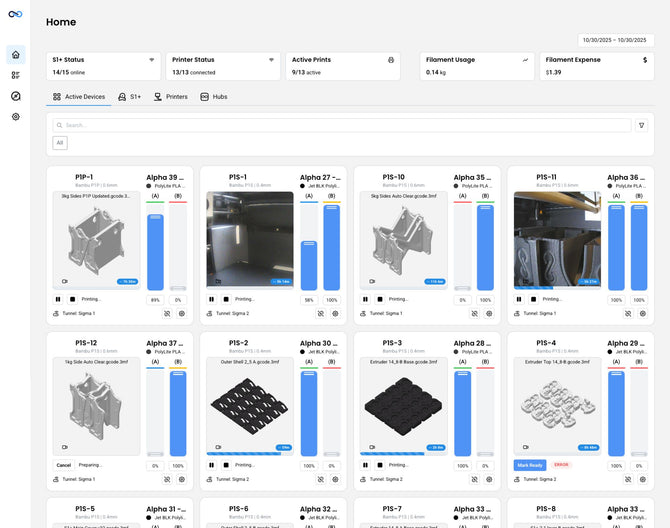
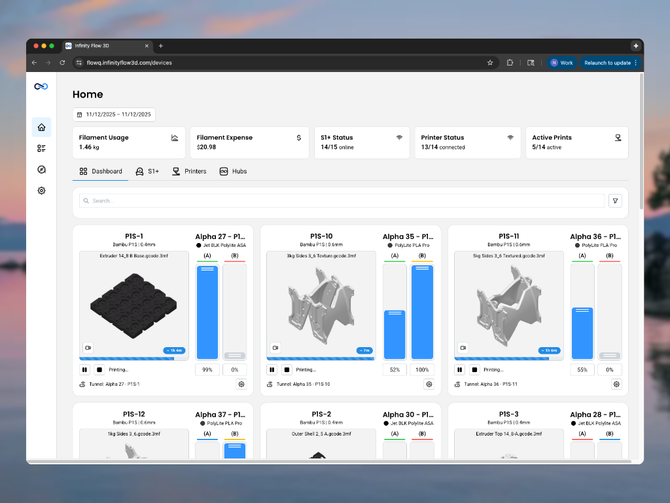
The main dashboard of FlowQ, a 3d printer fleet management software
Funktioniert mit Tools, die Sie bereits nutzen
Siehe Integrationen

Von echten Print-Farm-Betreibern gebaut

Wir haben FlowQ gebaut, um:

FlowQ begann als internes System, um unsere Druckerei effizienter zu gestalten, und wurde seither zu einer sicheren, gut unterstützten Plattform weiterentwickelt, die wir Ihnen zur Verfügung stellen.


Weniger Zeit auf die Druckerverwaltung verwenden

FlowQ hilft Ihnen dabei, wiederkehrende Aufgaben zu bewältigen, die Produktion zu zentralisieren und die Drucker am Laufen zu halten, während Sie jeden Tag Ihre Arbeitslast reduzieren.

Vereinfachen Sie Ihren Workflow
A gif of Uploading a file to FlowQ, a 3D printer fleet management app, to be used across all printers in a print farm.

Dateien einmal hochladen

Hören Sie auf, Dateien auf mehreren Druckern und SD-Karten zu synchronisieren.

Laden Sie Ihre Dateien einfach in das zentrale Dateisystem von FlowQ hoch.

Dateien werden bei Bedarf automatisch an Drucker gesendet und auf all Ihren Maschinen geteilt.

A gif of Uploading a file to FlowQ, a 3D printer fleet management app, to be used across all printers in a print farm.
The FlowQ 3D printer fleet management software interface showing a queue with various files and settings on a blurred outdoor background

Druckaufträge mit einer Warteschlange planen

Verschwenden Sie keine Zeit mehr damit, herauszufinden, was als Nächstes gedruckt werden muss.

Planen Sie Ihre Druckaufträge im Voraus und lassen Sie FlowQ die Aufträge an die richtigen Drucker leiten und alles verfolgen.

The FlowQ 3D printer fleet management software interface showing a queue with various files and settings on a blurred outdoor background
Showing how FlowQ can be used to safely test 3d print automatic ejection systems.

Für jedes Druckauswurf-System

Druckaufträge automatisch und/oder fernstarten

Start jeden Druck von überall.

Oder lassen Sie FlowQ den nächsten Auftrag automatisch starten, wenn Sie ein automatisches Auswurfsystem verwenden.

Kompatible Auswurfsysteme anzeigen
Showing how FlowQ can be used to safely test 3d print automatic ejection systems.
The FlowQ 3D print farm management Software interface with graphs showing filament usage data and settings on a blurred natural background

Glühfadeninventar & -verbrauch verfolgen

Ihnen geht nie wieder das Filament aus

Der Filamentbestand und -verbrauch werden bei der Verwendung des S1+ in Echtzeit aktualisiert.

The FlowQ 3D print farm management Software interface with graphs showing filament usage data and settings on a blurred natural background
3D printing workflow automation steps using Shopify, FlowQ, and Slack on a light gray background.

Automatisierte Workflows erstellen

FlowQ lässt sich in Automatisierungstools wie Zapier und Make integrieren, um benutzerdefinierte Workflows für Ihre 3D-Drucker zu erstellen.

Verbinden Sie sich mit über 8.000 Apps über Zapier, Make und die FlowQ API.

Siehe Integrationen & API
3D printing workflow automation steps using Shopify, FlowQ, and Slack on a light gray background.

Unsere Funktionen

Entwickelt für unsere Drucker, jetzt verfügbar für Ihre

Kernfunktionen, die reale Arbeitsabläufe in Druckereien und den täglichen Produktionsbedarf unterstützen sollen.

Jetzt starten

Zentrales Dashboard

Überwachen Sie den Druckerstatus Ihrer gesamten Flotte – selbst bei verschiedenen Marken und Druckertypen.

Zentrales Dateisystem

Vermeiden Sie die Synchronisierung von Dateien über mehrere Drucker und SD-Karten hinweg. Dateien werden über alle Ihre Maschinen hinweg geteilt.

Integrationen & API

FlowQ lässt sich in Automatisierungstools integrieren, um benutzerdefinierte Workflows für Ihre 3D-Drucker zu erstellen.

Automatischer Neustart

Lassen Sie FlowQ den nächsten Auftrag automatisch starten, wenn Sie ein automatisches Auswurfsystem verwenden. Konfigurieren Sie Schleifeneinstellungen und erstellen Sie eine vollständige Druckwarteschlange.

Anpassbare Warteschlange

Planen Sie Ihre Druckaufträge im Voraus und lassen Sie FlowQ die Aufträge an die richtigen Drucker leiten und alles verfolgen.

Filament-Nachverfolgung

Nie wieder Filamentmangel, wenn Sie es am dringendsten brauchen. Filamentbestand und -verbrauch werden bei Verwendung des S1+ in Echtzeit aktualisiert.

Fernzugriff

Melden Sie sich weltweit bei FlowQ an. Lassen Sie Drucke auch am Wochenende und während Ihrer Abwesenheit weiterlaufen.

Sichere Nutzerdaten

Cloud-Daten nutzen eine durchgängige und Ruhezustands-Verschlüsselung aller Nutzerdaten. Stolz entwickelt und gehostet in den USA.


Rüsten Sie Ihre 3D-Druckfarm auf

Von Betreibern von Druckfarmen geschätzt, die eine einfachere, zuverlässigere Methode zur Steuerung der Produktion suchen.

Jetzt starten

Häufig gestellte Fragen

Antworten auf einige unserer häufigsten Fragen.

What is a printer connection?

A printer connection is any 3D printer that is both:

  1. Registered to your FlowQ account, and
  2. Connected to a FlowQ Tunnel (such as a FlowQ Hub or S1+).

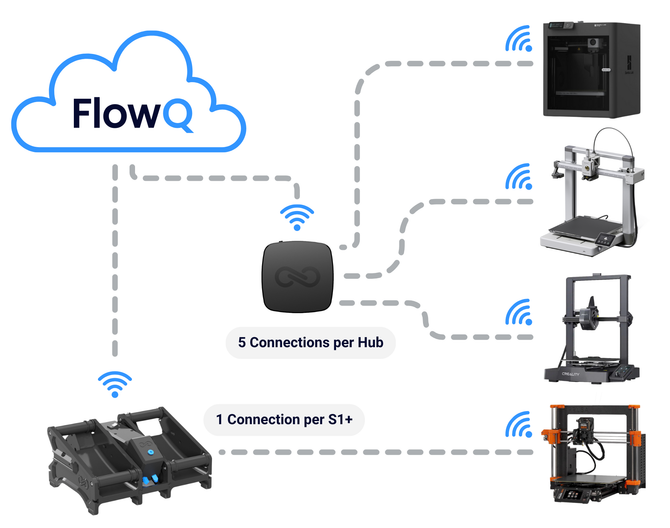
You can register unlimited printers to your FlowQ account. However, only printers that are actively connected to a Tunnel count as printer connections and can be controlled through the FlowQ dashboard.

If a printer is registered but not connected to a Tunnel:

  • You will not be able to start prints from FlowQ
  • The printer will appear Offline
  • It will display the label “No tunnel selected”

You can switch which printers are connected to a Tunnel at any time inside your account. This allows you to manage and control only the printers you actively want connected to the cloud, while keeping others registered but inactive. Connecting a printer is as simple as selecting a tunnel from a drop down menu.

What is a print job?

A print job is counted any time a print is successfully started on a 3D printer from your FlowQ account.

Print job usage resets on the first day of every month for users on the Free or Basic Plan.

If you reach your monthly print job limit, FlowQ will pause your queue and will not send the next job to a printer until your usage resets.

If a print is stopped before completion, it may still count toward your monthly print jobs if it successfully started and began printing. However, jobs that never begin printing — such as failed uploads or printer-side errors that prevent the print from starting — are not counted.

You can view your complete print history at any time from the FlowQ dashboard to see all jobs started from your account.

Can FlowQ handle automatic print ejection systems?

Yes. FlowQ is designed to integrate seamlessly with automatic ejection setups. You can queue multiple jobs back-to-back or setup loops for continuous, unattended printing.

What can I control remotely?

All FlowQ features are fully accessible from anywhere in the world.

Just log into your account to view live printer status, manage print queues, and control jobs remotely without needing to be on the same Wi-Fi network.

Every FlowQ tunnel creates a secure, encrypted connection to the cloud, so you get complete access to your print farm from any device, wherever you are.

Is the cloud connection secure?

FlowQ is proudly developed and hosted in the United States with security built into every layer.

All data is protected with end-to-end encryption, meaning information traveling between your printers and the FlowQ cloud is fully encrypted during transmission.

We also use encryption at rest, so any data stored in our databases remains secured even when not in use. This dual-layer approach ensures that print data, device credentials, and user information are always protected against unauthorized access.

Additionally, all Wi-Fi credentials are stored locally on your device tunnels and are never uploaded or stored in the cloud, ensuring complete protection of your network details.

Can I view my S1+ app data in FlowQ?

Yes. The S1+ app is being fully merged into FlowQ, and all existing S1+ features will be available inside FlowQ with a cleaner, faster, and more intuitive interface. You’ll be able to view and manage your S1+ data directly from the FlowQ dashboard.

No paid subscription is required to access any features previously available in the S1+ app. You can also register devices, add printers, create filament profiles, track filament usage, and explore the full dashboard without a subscription. A paid plan is only required if you want to connect printers to the cloud (necessary to for most 3D Printer related functionality).

Is there a free trial for FlowQ?

You can get started completely free using the FlowQ Free Plan — no credit card required. You can create an account, access the full dashboard, add printers, register tunnels, and start starting up your dashboard at no cost.

If you need higher usage limits than the free plan offers, you can upgrade at any time. FlowQ is designed to scale with you — start free, upgrade when you’re ready.

Will the S1+ app and FlowQ be combined?

Yes. The S1+ app is being fully merged into FlowQ to create one unified platform.

All features from the S1+ app — including filament tracking, device management, and remote monitoring— will be available directly inside FlowQ with a faster, more intuitive interface.

And importantly, every feature that was previously free in the S1+ app will remain free forever. Once merged, you’ll be able to access everything from a single dashboard with improved performance, reliability, and usability.

How much does FlowQ cost?

You can start using FlowQ completely free — no credit card required. You can create an account, access the full dashboard, add printers, register devices, and start organizing your setup at no cost.

If you need higher usage limits than the free plan offers, you can upgrade to any of our paid plans at any time. More details can be found here.

What makes FlowQ unique?

FlowQ was built from real-world print farm experience in our high output production environment.

It combines automation, monitoring, and queue control into one intuitive platform. No local servers, no complex setup, and powerful features that stay simple to use.

It’s effortless to setup, free to get started, and easily expandable as your print farm grows.

Can I use FlowQ with Shopify Flow?

Yes.

FlowQ can be integrated with Shopify Flow by using the FlowQ Open API together with HTTP request actions in Shopify Flow.

This allows you to automate actions based on Shopify events such as:

  • New orders
  • Order line items
  • Inventory changes
  • Fulfillment updates
  • Custom Shopify workflows

For example, you can automatically enqueue print jobs in FlowQ when an order is placed or updated.


Important note about Shopify plans:

Sending HTTP requests directly from Shopify Flow is limited by Shopify plan level. On plans where HTTP requests are not available, third-party Shopify apps can be used to send HTTP requests from Flow, allowing FlowQ automations to work on the Shopify Basic plan as well.


This makes it possible to build FlowQ-powered print automations on nearly any Shopify setup.