



Many print farms start with Bambu printers and quickly discover Bambu Farm Manager.
It allows you to monitor and control multiple Bambu printers from one place, which can be useful when managing several machines on a local network.
However, as farms grow, many operators begin searching for a Bambu Farm Manager alternative that supports automation, remote management, and mixed printer fleets.
This guide compares Bambu Farm Manager vs FlowQ to help you understand the differences and determine which solution is best for your print farm.
Table of Contents
- What Is Bambu Farm Manager
- What Is FlowQ
- Feature Comparison: Bambu Farm Manager vs FlowQ
- Continuous Printing and Automation
- Remote Access and Infrastructure
- Automation and Business Workflows
- When Bambu Farm Manager Makes Sense
- When FlowQ Is the Better Choice
- FAQ
What Is Bambu Farm Manager
Bambu Farm Manager is software developed by Bambu Lab to manage multiple Bambu printers from a single interface.
It allows operators to upload files, monitor printers, and control several machines at once from a local system.
The software is designed specifically for the Bambu ecosystem, so it works best when every printer in the farm is a Bambu printer.
- Monitor multiple Bambu printers
- Upload and start prints remotely on the local network
- Run basic batch jobs
- Manage groups of printers
What Is FlowQ
FlowQ is software designed specifically for managing and automating 3D printer fleets.
Instead of focusing on a single printer brand, FlowQ is built to support mixed printer environments and production workflows.
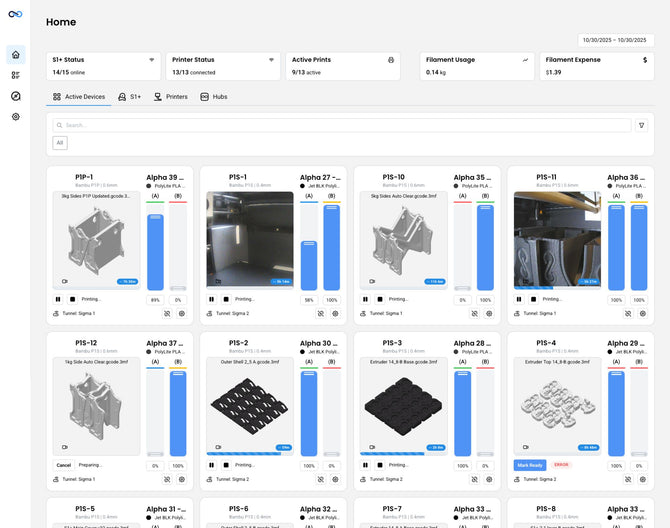
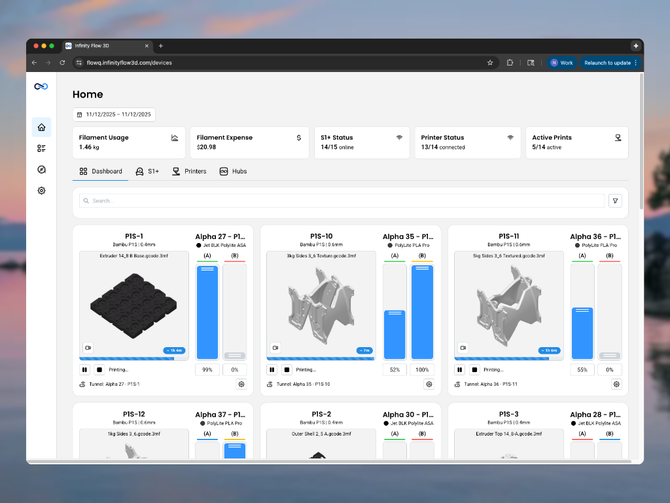
The platform allows operators to manage printers, production queues, and automation workflows from a centralized dashboard.
- Centralized production queue
- Automatic job scheduling
- Continuous printing workflows
- Remote printer monitoring
- Business workflow automation
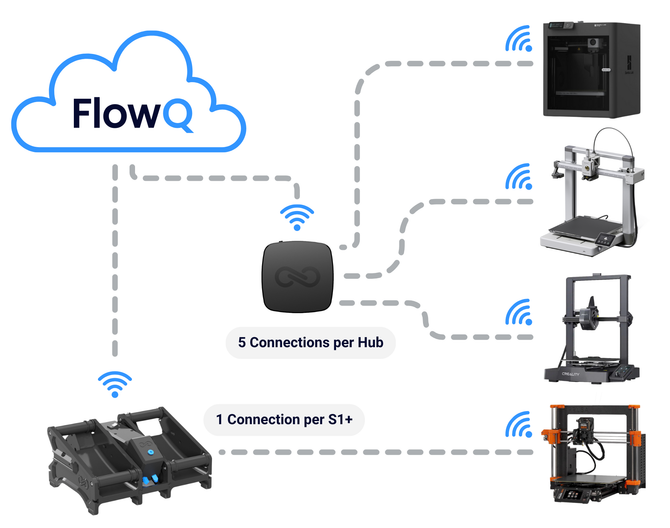
FlowQ runs in the cloud and connects to your printers using either the FlowQ Hub (a small dedicated tunnel device) or FlowQ Connect, a lightweight app that runs directly on your Mac, Windows, or Linux computer — including headless Linux systems.

Feature Comparison: Bambu Farm Manager vs FlowQ
| Bambu Farm Manager |
 |
|
|---|---|---|
| Price | Free | Free plan available |
| Queue System | Basic task queue | Centralized production queue |
| Smart Job Routing | ❌ none | ✅ Supported |
| Continuous Printing | ❌ Manual restart required | ✅ Automatic restart supported |
| Auto-Ejection Workflows | Possible but requires manual restart | Fully supported with automatic queue restart |
| Remote Access | ❌ none | ✅ Full remote access |
| Camera Monitoring | Limited by network | ✅ Remote camera access for all Bambu printers (and most other models) |
| Hosting Requirements | Requires local computer or server | Cloud based |
| Automation Integrations | ❌ none | ✅ Open API, Zapier, and Make integrations |
Continuous Printing and Automation
Bambu Farm Manager includes a basic queue system but cannot automatically start the next task when a print finishes.
If you are using auto-ejection systems or part removal G-code, each print must still be restarted manually.
FlowQ was designed with extra features specifically for these workflows.
- Automatically restart prints after ejection
- Run continuous production queues
- Schedule jobs across multiple printers
- Reduce manual intervention between prints

Remote Access and Infrastructure
Bambu Farm Manager runs locally and requires a computer or server that stays powered on at all times.
FlowQ runs entirely in the cloud. Printers connect using either the FlowQ Hub (a lightweight dedicated device) or FlowQ Connect, an app you install on any Mac, Windows, or Linux machine — including headless Linux setups. No additional hardware is required when using FlowQ Connect.
Because the platform is cloud-based, operators can access their print farm remotely from anywhere and monitor printer cameras through the dashboard.

Automation and Business Workflows
FlowQ includes automation capabilities designed for production businesses.
- Open API for custom integrations
- Zapier integration
- Make integration
- Workflow automation triggered by external systems
For example, some print farms use FlowQ to automatically start prints when orders are placed through Shopify.
When Bambu Farm Manager Works
- Your farm uses only Bambu printers
- You only need basic printer monitoring
- You do not require automation
- You already have a computer running full-time
When FlowQ Is the Better Choice
- You may want to use multiple printer brands in the future or you already do.
- You want centralized production queues
- You want automated continuous printing
- You want remote access to printers and cameras
- You want automated business workflows
FAQ
What is the best Bambu Farm Manager alternative?
FlowQ is a common alternative because it supports mixed printer fleets, remote access, and automation workflows designed for print farms.
Can FlowQ work with Bambu printers?
Yes. FlowQ can connect to Bambu printers and manage them alongside other printer brands.
Does FlowQ require a server?
No. FlowQ runs in the cloud. You can connect your printers using a FlowQ Hub or by installing FlowQ Connect on any Mac, Windows, or Linux computer you already have — including headless Linux systems.
Does FlowQ let you use Bambu Handy features?
FlowQ does require you to put Bambu printer's in LAN-only mode with developer mode enabled, however, unlike Bambu Farm Manager, FlowQ can be used to remotely control your printers and view camera feeds.

