



3DPrinterOS and FlowQ are both platforms designed to help operators manage multiple 3D printers from a central interface.
3DPrinterOS has historically positioned itself toward education, labs, and enterprise environments — offering broad printer compatibility, multi-user access management, and remote monitoring tools for institutional deployments.
FlowQ is designed specifically around production print farms, focusing on queue management, automation workflows, and keeping printers producing parts with minimal manual intervention.
This comparison looks at 3DPrinterOS vs FlowQ across the priorities that matter most to print farm operators: queue management, production automation, setup, mixed-fleet support, remote monitoring, and pricing. One important note: public community discussion about 3DPrinterOS is relatively limited compared to other platforms in this space, so some aspects of the product may require contacting their team directly for a full picture.
Table of Contents
- What Is 3DPrinterOS
- What Is FlowQ
- Feature Comparison: 3DPrinterOS vs FlowQ
- Production Queue Management
- Automation and Continuous Printing
- Mixed Printer Fleet Compatibility
- Setup and Deployment
- Remote Monitoring and Visibility
- Pricing and Scalability
- Key Difference in Philosophy
- When 3DPrinterOS Makes Sense
- When FlowQ Is the Better Choice
- FAQ
What Is 3DPrinterOS
3DPrinterOS is a cloud-based 3D printer management platform that supports remote monitoring, job submission, and multi-user access control across multiple printers.
The platform is commonly used in schools, university labs, makerspaces, and enterprise environments where multiple users need managed access to shared printer resources.
- Remote printer monitoring and job submission
- Multi-user access and permission controls
- Broad printer compatibility across many models
- Cloud and enterprise deployment options
- Job queue and file management
Some configuration options and pricing for larger deployments may require direct contact with the 3DPrinterOS team, as these details are not always fully documented in public resources.
What Is FlowQ
FlowQ is a cloud-based print farm management platform built around production workflows and automation for operating multiple printers continuously.
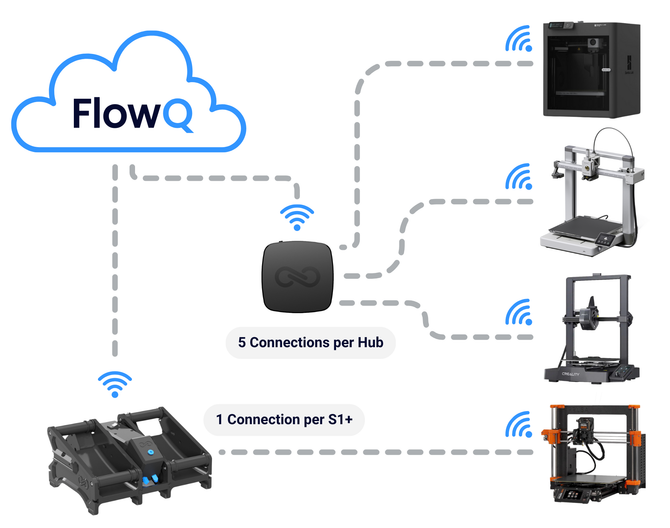
Printers connect through a FlowQ Hub tunnel device — one Hub connects up to five printers to the platform with no local server or per-printer software required.
- Centralized production queue with automatic job routing
- Automatic print restart and continuous printing workflows
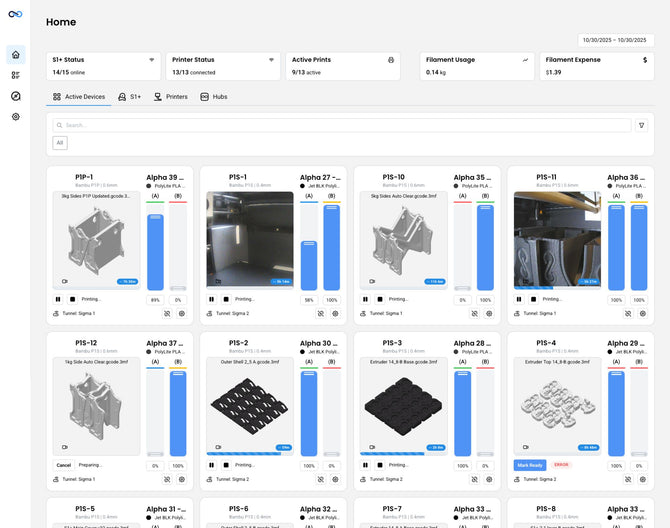
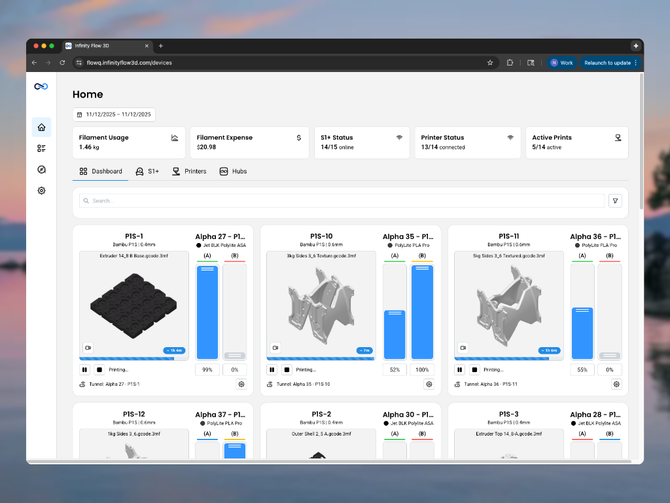
- Remote printer control and live camera access from anywhere
- Support for 60+ printer models across mixed fleets
- Zapier, Make, and open API integrations
- Core automation features included on the free plan

Feature Comparison: 3DPrinterOS vs FlowQ
| 3DPrinterOS |  |
|
|---|---|---|
| Base Price | $19/month (2 printers, 1 user); enterprise pricing requires contact | Free plan available (no credit card) |
| Automation Features | ❌ Not emphasized publicly | ✅ Included on free plan |
| Production Queue | Job queue available — general printer administration focus | ✅ Built around print farm production workflows |
| Automatic Print Restart | ❌ Not emphasized publicly | ✅ Included on free plan |
| Continuous Printing | ❌ Not a primary focus | ✅ Supported with any ejection method |
| Remote Monitoring | ✅ Emphasized feature | ✅ Full remote access and camera monitoring |
| Setup Requirements | Cloud and enterprise options; some setup may require team coordination | One FlowQ Hub per 5 printers — no server needed |
| Setup Difficulty | Moderate — enterprise options may require onboarding support | Easy — plug in Hub, connect printers, done |
| Mixed Fleet Support | ✅ Wide printer compatibility | ✅ 60+ printer models supported natively |
| Third-Party Integrations | Limited publicly documented | ✅ Zapier, Make, and open API |
Production Queue Management
Managing a large volume of jobs across many printers is one of the most common challenges in running a print farm. Without proper queueing, operators end up manually restarting prints and constantly uploading files to keep machines running.
3DPrinterOS includes job queue functionality and supports multiple users submitting print jobs to a pool of printers. The system is capable of routing jobs to machines and managing file submissions, but its messaging is focused more on printer administration and access management than on production-oriented workflows.
FlowQ's queue system is built directly around print farm production. Jobs are organized into queues, automatically routed to the right printers or printer groups, and the next job starts as soon as a printer is available. The goal is to keep machines busy with as little manual input as possible.
For farms running repeat production jobs or continuous manufacturing workflows, this production-first approach to queueing tends to be more practical than a general printer management queue.
Automation and Continuous Printing
Many print farms aim to automate production as much as possible — prints eject automatically, the next job starts immediately, and queues run production batches without operator involvement between each print.
3DPrinterOS supports remote job control and printer management, but its automation capabilities are not heavily emphasized in its public documentation. The platform appears oriented more toward managing who can access printers and sending jobs to machines rather than enabling production automation systems.
FlowQ was designed with automation workflows as a primary use case. Users commonly pair FlowQ with part ejection systems, automated bed-clearing hardware, and tools like FarmLoop to build continuous production workflows. Once a job finishes and the part is removed, FlowQ automatically starts the next task in the queue.
For high-throughput production farms, this kind of automation capability is often the deciding factor in platform selection.

Mixed Printer Fleet Compatibility
Most growing print farms end up running printers from multiple manufacturers. Software that works well only within a single ecosystem can become a real constraint as the farm scales.
3DPrinterOS has historically supported a wide range of printer models and claims broad compatibility across many brands. This has been a core part of its positioning, particularly for institutions that deploy diverse hardware.
FlowQ supports 60+ printer models natively through the FlowQ Hub, with a focus on the printer brands most commonly used in production print farms. Different printer brands can be managed within the same queue and production workflow without requiring additional per-printer software or middleware.
Both platforms aim for broad compatibility, but FlowQ's focus is specifically on practical print farm use cases rather than broad institutional compatibility across legacy or specialized hardware.
Setup and Deployment
Many print farms are run by small teams or individuals who do not want to spend time on IT infrastructure. Software that requires extensive configuration or onboarding coordination can slow adoption and add ongoing maintenance burden.
3DPrinterOS offers both cloud and enterprise deployment options. For standard use, setup is relatively straightforward, but some features and enterprise configurations appear to require working directly with their team. Public documentation does not always describe the full setup process, which may mean onboarding involves additional coordination for more complex deployments.
FlowQ connects printers through a FlowQ Hub — a small tunnel device that links printers to the cloud platform without requiring a local server, dedicated hardware, or complex network configuration. One Hub supports up to five printers, and setup is designed to take minutes rather than hours.
For farms that want to get running quickly and avoid ongoing infrastructure maintenance, this hardware-assisted connection model is a meaningful advantage.
Remote Monitoring and Visibility
Print farm operators need to quickly see which printers are running, which jobs are complete, and when something needs attention. Remote monitoring reduces the need to be physically present to keep production on track.
Remote monitoring is one of 3DPrinterOS's most emphasized features. The platform supports remote viewing, notifications, and monitoring tools, and this visibility layer is central to its product positioning — particularly for institutional environments where oversight across many users and machines is important.
FlowQ also provides remote monitoring, printer status visibility, and live camera feeds as part of its platform. The distinction is that FlowQ's primary emphasis is on workflow automation and production control, with monitoring as part of a broader operational picture rather than the core feature.
For farms where the priority is production output rather than institutional oversight, this difference in emphasis matters when choosing a platform.
Pricing and Scalability
Software costs can scale quickly as farms grow from a handful of printers to dozens of machines.
3DPrinterOS starts at $19/month, which covers 2 printers and 1 user. For farms with more printers or users, pricing requires contacting their team directly — which makes it difficult to forecast costs before committing. There is no free plan to evaluate the platform before purchase.
FlowQ's pricing is straightforward and starts for free. The free plan includes core production features — job queues, automatic print restarts, and production scheduling — with no credit card required. Paid plans scale on a per-printer basis, with the Unlimited plan running approximately $3–4 per printer per month for larger fleets.
For smaller farms or operators evaluating their options, the ability to start on FlowQ's free plan before spending anything is a meaningful advantage over a platform that requires payment from the first printer.
Key Difference in Philosophy
The core difference between 3DPrinterOS and FlowQ comes down to who each platform was designed for.
3DPrinterOS is built around managed access to printers — allowing multiple users in an institution to submit jobs, monitor progress, and control access to shared machines. This is well suited to schools, labs, and enterprise environments where oversight and access management are the primary concerns.
FlowQ is built around production output. The platform's core purpose is keeping printers running — routing jobs automatically, restarting prints, managing queues, and connecting the farm to business workflows. Monitoring and access management exist, but production automation is the foundation.
For organizations that need institutional printer management, 3DPrinterOS may be the stronger fit. For operators running production print farms where throughput and automation are the priority, FlowQ is designed specifically around those needs.
When 3DPrinterOS Makes Sense
- You manage printers in a school, university lab, or shared makerspace environment
- Multi-user access control and job submission management are a primary requirement
- You need a platform with a long track record of broad institutional printer compatibility
- Remote monitoring and visibility are more important than production automation
When FlowQ Is the Better Choice
- You run a production print farm and need printers to stay busy with minimal manual work
- You want automation features — job queues, automatic restarts, continuous printing — without paying for a higher-tier plan
- You want simple setup without coordinating enterprise onboarding
- You run or plan to run a mixed fleet of multiple printer brands
- You want to connect your print farm to Shopify, Zapier, Make, or other business tools
- You want transparent, scalable pricing you can evaluate for free
FAQ
What is the best alternative to 3DPrinterOS for a production print farm?
FlowQ is one of the most commonly evaluated alternatives for production-focused print farms. It includes queue management, automatic print restarts, and continuous printing workflows on its free plan, and is built around the production workflows that high-volume farms rely on — rather than the institutional access management that 3DPrinterOS is designed for.
Does FlowQ offer the same remote monitoring as 3DPrinterOS?
Yes. FlowQ provides remote printer monitoring, status visibility, and live camera feeds. The difference is that FlowQ pairs monitoring with production automation — so operators can not only see what is happening, but also manage queues, restart prints, and control production workflows remotely from the same platform.
Is FlowQ easier to set up than 3DPrinterOS?
For most print farms, yes. FlowQ connects printers through a FlowQ Hub tunnel device — one Hub supports up to five printers with no local server or complex network configuration required. Some 3DPrinterOS enterprise configurations may require direct onboarding coordination with their team.
Can FlowQ manage the same range of printers as 3DPrinterOS?
FlowQ supports 60+ printer models natively, covering the brands most commonly used in production print farms. Both platforms aim for broad compatibility, but FlowQ's focus is on the practical mixed-fleet use cases that production farms encounter rather than broad institutional compatibility lists.
Does FlowQ support automation workflows that 3DPrinterOS does not?
Yes. FlowQ is specifically built for automated production workflows — including integration with part ejection systems, tools like FarmLoop, and custom G-code automation. When a part is removed, FlowQ automatically starts the next job in the queue. 3DPrinterOS does not publicly emphasize this kind of continuous production automation.
Is FlowQ free to try?
Yes. FlowQ offers a free plan that includes core production features — job queues, automatic restarts, and production scheduling — with no credit card required. This makes it straightforward to evaluate whether FlowQ fits your workflow before committing to a paid plan.

